THE MARKETING HUB
One intake portal — Kanban, calendar, and project tracker in sync
The Problem
Marketing requests arrived by email, Slack, and hallway. Nothing was tracked in a single place. Deadlines surprised the team because each request lived wherever it was submitted — a thread here, a sticky note there, a forwarded message that sat in someone's inbox. Duplicate requests burned hours: two people independently commissioning the same asset, neither aware the other had asked.
The deeper problem was capacity invisibility. When a new request landed with a tight deadline, there was no systematic way to answer whether it could actually be done by then — the answer came from whoever happened to have context, not from the data. That meant either over-promising or a last-minute scramble to reprioritize.
The team also used a spreadsheet tracker as its record-of-truth, shared with an outside partner team. Any new intake tool had to sync there — not replace it — which meant the integration had to be a first-class citizen, not an afterthought.
The Solution
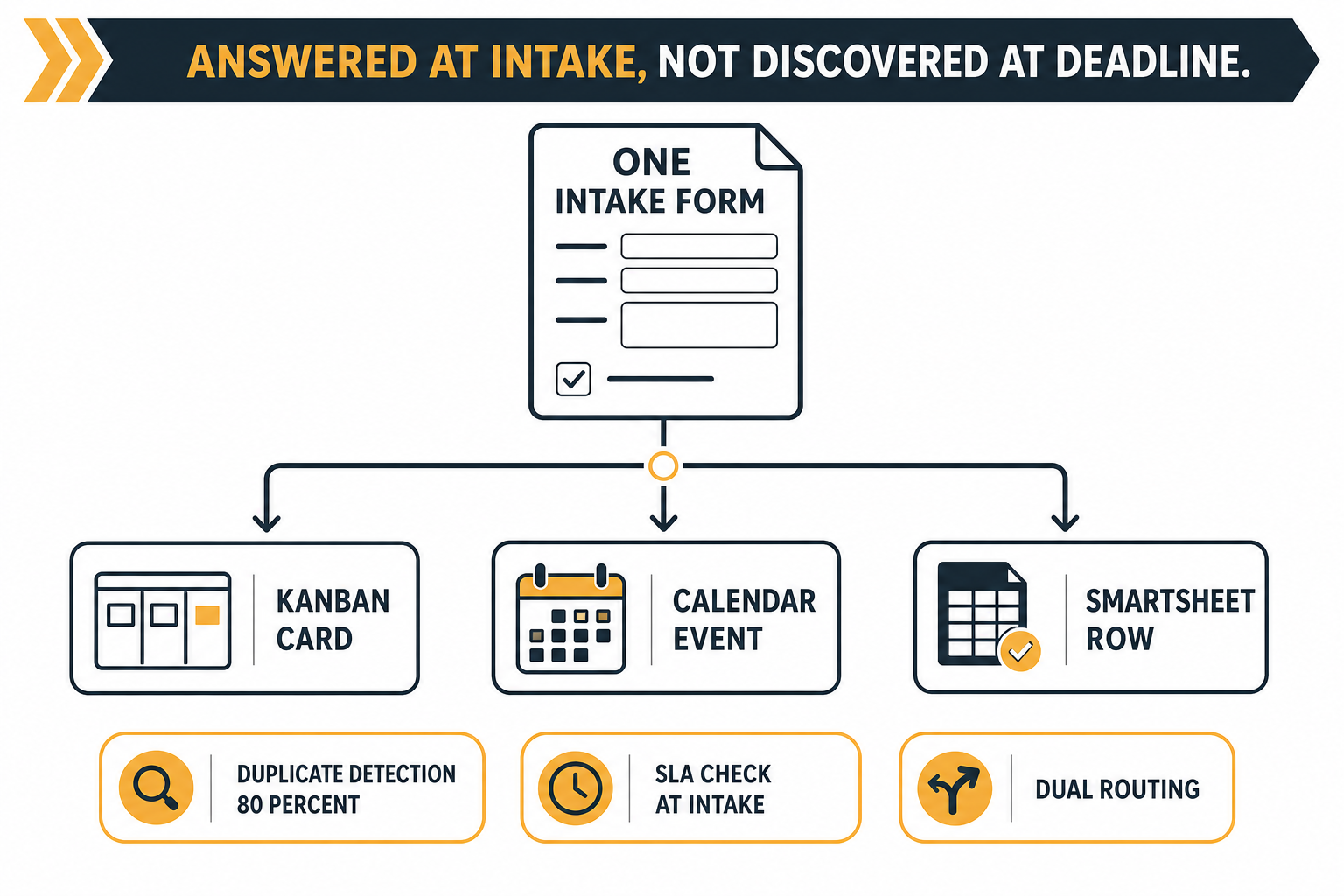
The Marketing Hub is a production marketing-operations portal, deployed as a private internal tool (). One submission form — 12 fields covering task description, requester, priority, deadline, objective, audience, deliverables, services, reference links, destination, assignee, and date — creates three artifacts at once: a Kanban card on the live board, a deadline entry on the priority-coded calendar, and a synced row in the appropriate project tracker. All three views are generated from the same record and always reflect the same state.
One submission. One validated record. Three views, always in sync.
The Kanban board uses drag-drop swimlanes so status updates happen where the work is visible. The calendar codes entries by priority so the team sees crunch points before they arrive. Neither view requires a separate manual entry after intake — the record propagates automatically and the tracker sync tracks its own status per row so failures surface immediately.
The portal is built on an existing brand system, so it looks like one of the organization's own products, not an off-the-shelf tool skinned for the org.
Craft Details
DUAL-DESTINATION ROUTING
A toggle switches the request between the internal marketing-ops team and an outside partner team. The assignee dropdown re-populates on the fly per destination. The record syncs to the matching tracker sheet, and per-row sync status is tracked as pending / synced / error — so nothing falls silently into a queue black hole.
GRACEFUL DEGRADATION
If the tracker integration is unconfigured or the API is down, the form still saves locally and the submitter sees an honest sync-failure notice. Data is never lost to an integration hiccup. The local record stays authoritative; the sync is a convenience, not a precondition.
DUPLICATE DETECTION
Automated near-duplicate detection flags repeat requests before they enter the queue. A duplicate banner surfaces at submission time — not in a weekly triage meeting — so the submitter can reference the existing request or cancel.
SLA CAPACITY CHECK
On submission, the deadline is validated against per-service SLA definitions and live team-capacity records. "Can this actually be done by then?" is answered at the door, not discovered when the deadline slips. Submissions that fail the check surface a conflict notice with the earliest feasible date.
Built to Be Demonstrated
The portal shipped with a written walkthrough guide intended for a CMO demo. That constraint shaped the design: every view had to be immediately legible to a non-technical audience, and the happy path — submit a request, watch it appear on the board and calendar, confirm the tracker row — had to work flawlessly on the first try. Onboarding theater is the enemy of adoption; the guided walkthrough exists to show the value in under five minutes, not to paper over a complicated interface.
Building on the existing brand system was critical here. A portal that looks foreign to the organization gets ignored. One that looks like it belongs gets used.
The Build Angle
The routing and project-tracker integration wave — 30 commits across May 31 and June 1, 2026, building on the core product shipped in the first two days — was built spec-first. The spec was decomposed into small, clean-scoped pieces, each piece was implemented and checked against it, and everything was reviewed before deploy. That is the same spec-first discipline documented at /work/conductor-pattern: spend the judgment up front, keep the implementation mechanical. The integration wave landed without regressions to the core product — the spec was tight enough that nobody needed to infer scope.
Stack
Result
The build broke into two focused waves. The core product — intake form, Kanban board, calendar view, database schema, all 28 API endpoints — shipped in the first two days. The routing and tracker integration wave followed on May 31–June 1: dual-destination routing, per-row sync status, duplicate detection, and the SLA capacity check. Thirty commits, two phases, one production deployment as a private internal tool ().
Request volume since launch and adoption rate are not tracked — there are no analytics on the live site by design. Per-row tracker sync outcomes are logged individually but have not been aggregated into a success rate. These gaps are intentional: the org values data ownership over telemetry. The honest answer to "how is it performing?" is that the data exists in the database, not in a dashboard.
The Intake Flow
Answered at intake, not discovered at deadline.